# Better Stack vs OnPage: A Complete Comparison for 2026
If you're looking at OnPage, you probably have a very specific pain: alerts that actually wake you up. Not the kind that get buried in email, not the kind your phone ignores because it's on silent. You want something that will keep ringing until someone answers. OnPage has built its entire reputation around solving that problem, and in that narrow, high-stakes niche, it does it well.
But before you sign up for OnPage, it's worth stepping back and asking what you're actually building toward. **OnPage is a notification routing layer. It takes alerts from other tools and delivers them reliably to whoever is on call**. What it doesn't do is collect your logs, trace your requests, track your infrastructure metrics, or tell you why an alert fired in the first place. That all happens somewhere else, in separate tools you're also paying for.
**Better Stack** approaches the same problem from a different direction. It **starts with your data, logs, metrics, distributed traces, uptime checks, error tracking, real user monitoring, and builds incident management on top of all of it**. When you get paged at 3am, you're not bouncing between four tools to figure out what happened. The logs, the traces, and the service map are already in the same place as the alert.
So this isn't a matchup between two competing products. OnPage and Better Stack are solving the same final problem (getting the right person to respond to a critical event) but from opposite starting points. Choosing between them really comes down to what you already have and what you're willing to pay for separately.
One thing worth saying upfront: this comparison won't pretend Better Stack wins everything. OnPage has HIPAA compliance that Better Stack doesn't. If you're in healthcare, that fact alone may end the conversation. OnPage also has a few features, like mass notifications via BlastIT and legacy pager protocol support, that Better Stack simply doesn't offer. Those are called out honestly below.
---
## Quick comparison at a glance
| Category | Better Stack | OnPage |
|----------|-------------|--------|
| **Primary use case** | Full-stack observability + incident management | Critical alerting + on-call management |
| **Deployment** | SaaS, minutes to first data | SaaS, mobile app install |
| **Instrumentation** | eBPF auto-instrumentation (zero code) | Integrates with external monitoring tools |
| **Log management** | Yes (SQL-queryable, 100% indexed) | No |
| **APM/Tracing** | Yes (eBPF-based, OpenTelemetry-native) | No |
| **Infrastructure monitoring** | Yes (PromQL, no cardinality penalties) | No |
| **On-call scheduling** | Yes (built-in) | Yes (core feature) |
| **Phone/SMS alerts** | Unlimited at $29/responder/month | Core feature across all plans |
| **HIPAA compliance** | No | Yes |
| **Pricing model** | Data volume + responders | Per user/month |
| **Status pages** | Yes (included) | No |
| **AI capabilities** | AI SRE, MCP server (GA) | Not present |
| **Healthcare-specific features** | None | Clinical communication, pager replacement |
---
## Platform architecture
Understanding how these two platforms are built explains almost everything else about them.
OnPage is, at its core, a mobile notification platform with a web management console on top. Its job is to take an alert that originates somewhere else (your monitoring tool, your RMM, your EHR) and make absolutely sure the right person on your on-call rotation sees it, even if their phone is silenced and it's 2am. The platform doesn't generate its own observations about your infrastructure. It doesn't store your logs or analyze your metrics. It waits for another system to say something is wrong, and then it makes sure that message gets through.
That's a deliberate architectural choice, not a limitation. If your problem is specifically that alerts aren't reaching people reliably, OnPage solves it cleanly without requiring you to replace anything else in your stack.
Better Stack makes a different bet. Rather than sitting on top of your existing monitoring tools, it is the monitoring tool. You deploy the eBPF collector, it starts capturing your logs, metrics, and distributed traces automatically, and everything lands in a unified warehouse where you can query it with SQL or PromQL. Incident management is built on top of that data layer, so when an alert fires and you open the incident, the supporting evidence is already there.
### Better Stack: unified observability with incident management

The eBPF collector is what makes Better Stack's architecture work. It runs at the kernel level, so it captures telemetry from your services without you changing a line of code. Deploy it to Kubernetes via Helm chart and it starts discovering your services automatically. You can watch exactly how that process works here:
Everything collected lands in a single data warehouse. Your logs, your metrics, and your traces all live together, which means when you're investigating an incident you don't have to mentally reconcile data from three different systems. You write one SQL query and you get your answer. The practical payoff shows up most clearly at incident time: your on-call person opens one interface and everything they need is already there.
### OnPage: persistent alerting layer

OnPage's architecture is purpose-built for one thing: delivery. Its distinctive capability is the Alert-Until-Read mechanism, where notifications keep firing, overriding your phone's silent mode, for up to eight hours until someone acknowledges them. Standard smartphone push notifications are easy to sleep through. OnPage's alerts are not.
The web management console is where administrators handle scheduling, escalation group configuration, reporting, and two-way dispatcher communication. The mobile app is where your on-call engineers actually live during incidents. Integrations with your RMM tools, PSA platforms, monitoring systems, and healthcare EHR platforms push alerts into OnPage, which then routes them based on your configured schedules and policies.
What OnPage doesn't have is any observability layer underneath. It doesn't collect data, it doesn't store your logs, and it has no metrics backend. If you're already running a monitoring platform you're happy with and your only gap is reliable alert delivery, that's a clean fit. But if you're building or re-evaluating your stack from scratch, you'll need to account for that external monitoring dependency in your total cost.
| Architectural aspect | Better Stack | OnPage |
|---------------------|--------------|--------|
| **Data collection** | eBPF (kernel-level, zero code) | Via external tool integrations |
| **Storage** | Unified warehouse (logs, metrics, traces) | Alert and message history only |
| **Observability primitives** | Logs, metrics, traces, RUM, errors | None |
| **Alerting** | Built-in monitors and on-call | Core product |
| **Mobile application** | Supplementary | Central delivery mechanism |
| **External integrations required** | Optional (already has monitoring) | Required (needs a monitoring source) |
| **Healthcare compliance** | SOC 2 Type II, GDPR | HIPAA, SOC 2, ISO 27001, PCI |
---
## Pricing comparison
The pricing models here are so different that a direct comparison requires some framing first.
OnPage charges per user per month. You pick a tier, multiply by headcount, and that's your bill, plus add-ons for phone features. What you're paying for is the alerting and communication layer. You still need to budget separately for whatever monitoring tool generates the alerts OnPage routes.
Better Stack charges for data volume plus responders. You pay for the gigabytes you ingest and store, and a flat rate per on-call person. The monitoring, the log storage, the tracing, the incident management, the status pages, and the alerting are all in that price. There's no separate line item for each capability.
### Better Stack: volume-based, all-inclusive
Better Stack charges for data ingested and stored, with responder seats for on-call alerting. There are no separate charges for incident management, status pages, uptime monitoring, or alert notifications. Everything is bundled.
**Pricing structure:**
- Logs: $0.10/GB ingestion + $0.05/GB/month retention
- Traces: $0.10/GB ingestion + $0.05/GB/month retention
- Metrics: $0.50/GB/month
- Error tracking: $0.000050 per exception
- Responders: $29/month (unlimited phone/SMS)
- Monitors: $0.21/month each
**100-host deployment example:** $791/month covers telemetry, incident management, status pages, uptime monitoring, and unlimited alerting for five responders.
No cardinality penalties. No indexing fees. No separate billing for on-call versus monitoring features.
### OnPage: per-user, tiered
OnPage offers three tiers:
- **OnPage:** $13.99/user/month (annual) or $16.99/user/month (quarterly)
- **Enterprise Silver:** $22.99/user/month (annual)
- **Enterprise Gold:** $28.99/user/month (annual)
The base plan covers alerts, on-call scheduling, escalation groups, HIPAA compliance, and audit trails. Enterprise Silver adds enhanced SLA and data restrictions. Enterprise Gold adds dedicated customer success and the highest-tier SLA.
Phone features, including dedicated lines, voicemail, and live call routing, are add-ons at all tiers. A dedicated line with voicemail runs $360/year for up to 500 minutes per month, plus $5/user/month for voicemail transcription.
**For 10 users on Enterprise Gold:** $289.90/month, plus add-ons for phone features, plus whatever you're paying for your monitoring stack.
That last part is what often gets overlooked. OnPage doesn't replace your monitoring tools. You still need something generating the alerts that OnPage routes. For most engineering and IT operations use cases, that means a separate observability platform. Are you currently paying for both and treating them as separate line items, or have you added them up to see the actual total?
### Cost comparison: 3-year TCO
For a team of 10 IT operations staff with a 50-host infrastructure:
| Category | Better Stack | OnPage + monitoring tool |
|----------|-------------|--------------------------|
| Observability platform | Included in volume pricing | $6,000-$20,000+/year (external tool) |
| On-call and alerting | $3,480/year (10 responders) | $3,479/year (10 users, Enterprise Gold) |
| Status pages | Included | Not available in OnPage |
| Phone/dedicated line | Included in responder fee | $360+/year add-on |
| HIPAA compliance | Not available | Included at all tiers |
| **3-year total (approx.)** | **$15,000-$25,000** | **$40,000-$80,000** (combined stack) |
The ranges are wide because monitoring tool costs vary dramatically. The point isn't the specific numbers, it's that when you evaluate OnPage, you need to include the cost of your monitoring stack to get a real comparison.
---
## On-call alerting and escalation
This is OnPage's home turf, and it deserves honest treatment. If you're comparing these two platforms on alerting and on-call mechanics specifically, the gap is smaller than you might expect. Both platforms handle scheduling, escalation policies, and phone/SMS delivery. Where they differ is in what happens before and after the alert.
### Better Stack
[Better Stack incident management](https://betterstack.com/incident-management) includes unlimited phone and SMS alerts at $29/month per responder, on-call scheduling, escalation policies, and AI-powered incident investigation. Here's an overview of how the full incident lifecycle works:
Because Better Stack generates alerts from its own monitors, the alert your on-call engineer receives comes bundled with context. When you open an incident, the logs, metrics, and traces that explain why the alert fired are already visible. You don't need to open a second tool to start investigating.
If your team runs incidents in Slack, Better Stack creates dedicated incident channels with investigation tools built in, so you're not switching between a Slack thread and a separate dashboard:
On-call scheduling handles rotation management, timezone-aware schedules, and automatic handoffs:
For more complex escalation workflows at the enterprise level:
### OnPage: persistent, intrusive alerting
OnPage's alert mechanism is what most of its customers are actually buying. The Alert-Until-Read system keeps firing, overriding your phone's do-not-disturb settings, for up to eight hours until someone acknowledges the message. Standard smartphone notifications get swiped away or slept through. OnPage's alerts don't give you that option.
You can set up an entire year's worth of on-call schedules in one session, including exceptions for individual weeks that deviate from the standard rotation. Escalation groups let you define a specific sequence of responders, so if the first person on call doesn't acknowledge within your configured window, the alert automatically escalates to the next in line, then the next, until someone responds.
OnPage shipped a refreshed mobile app in 2025 with improved readability and real-time visibility into your own and your team's on-call schedules. Message history is now device-independent, so your context doesn't disappear when you switch phones.
The two-way dispatcher communication feature is worth calling out specifically. Web console operators can initiate threaded conversations with mobile responders during live incidents, which is useful in NOC environments where one dispatcher is coordinating multiple field engineers. When was the last time you wished you had a dedicated dispatcher channel during a major incident, separate from the noise of a general Slack channel?
The gap that matters for software engineering use cases is what happens after you acknowledge an alert in OnPage. You know the alert fired. You know when, and you know you're responsible. But why it fired, what service is affected, what the logs say, what changed in the last deploy, all of that is in a different tool. You'll need to open it separately and start piecing the picture together. How many minutes per incident does your team spend on that context-gathering step before anyone can actually start fixing the problem?
| Alerting feature | Better Stack | OnPage |
|------------------|--------------|--------|
| **Phone/SMS alerts** | Unlimited (included at $29/responder) | Core feature, all tiers |
| **Silent mode bypass** | Yes | Yes (up to 8 hours persistence) |
| **Escalation policies** | Yes | Yes (rule-based, configurable intervals) |
| **On-call scheduling** | Yes (timezone-aware, rotations) | Yes (multi-year scheduling, exceptions) |
| **Alert context** | Logs, traces, metrics in same view | Alert message only |
| **Dispatcher console** | Slack/Teams native | Web console with two-way messaging |
| **Mass notifications** | No | Yes (BlastIT add-on) |
| **HIPAA compliance** | No | Yes |
| **Post-incident reports** | Auto-generated post-mortems | Post-incident reports |
---
## Log management
OnPage doesn't have log management, and this section isn't going to pretend otherwise. But it's worth explaining why that gap matters for how you'll actually work during incidents.
When an alert fires, your first instinct is to look at logs. What was the service doing right before it started failing? Are there error messages that explain the cause? Is this a database issue or an application issue? If you're using OnPage as your alerting layer, those logs live in whatever external tool you've connected to it. That means another login, another search interface, another context switch at exactly the moment you're trying to move fast.
### Better Stack
[Better Stack logs](https://betterstack.com/logs) indexes every log you ingest, immediately, at the full ingestion price. There's no separate indexing fee, no decision about which logs are "important enough" to make searchable, and no rehydration delay when you need logs that were archived to save money. Everything you've ingested is queryable the moment it arrives.
Watch how Live Tail provides real-time log streaming with filtering:
SQL querying works across all ingested data:
```sql
SELECT
service_name,
COUNT(*) as error_count,
AVG(duration_ms) as avg_duration
FROM logs
WHERE level = 'error'
AND timestamp > NOW() - INTERVAL '1 hour'
GROUP BY service_name
ORDER BY error_count DESC
```
You can also turn those queries directly into charts without leaving the logs interface:
And for queries you run frequently, presets save you from rewriting the same filters every time:
Pricing: $0.10/GB ingestion plus $0.05/GB/month retention. All logs are searchable at that price.
### OnPage
OnPage doesn't store, index, or query your application or infrastructure logs. If a log-based alert fires in your monitoring tool and gets routed through OnPage, you'll need to open the monitoring tool directly to see the underlying log data. That extra step happens during every incident, and it adds up over time.
| Log management | Better Stack | OnPage |
|----------------|--------------|--------|
| **Log storage** | Yes (100% indexed, immediately searchable) | No |
| **Query language** | SQL + PromQL | N/A |
| **Retention pricing** | $0.05/GB/month | N/A |
| **Real-time tailing** | Yes | N/A |
| **Log-based alerting** | Yes (native) | Via external integration only |
---
## Infrastructure monitoring
The story here is the same as with log management. OnPage doesn't collect or analyze infrastructure metrics. It receives alerts from systems that do. So this section is really about what you get with Better Stack that you'd need a separate tool to get alongside OnPage.
### Better Stack
[Better Stack metrics](https://betterstack.com/infrastructure-monitoring) uses volume-based pricing with no cardinality penalties. You can add as many tag dimensions as your analysis requires without worrying about unexpected cost multipliers. If you've ever flinched before adding a high-cardinality label to a metric because of what it would do to your bill in another platform, that concern goes away here.
The platform is fully Prometheus-compatible with complete PromQL support:
If you prefer writing PromQL queries directly:
And if you'd rather skip writing queries entirely, the drag-and-drop chart builder does the same job visually:
Integration coverage is 100+ covering all major stacks: MCP, OpenTelemetry, Vector, Prometheus, Kubernetes, Docker, PostgreSQL, MySQL, Redis, MongoDB, Nginx, and more.
### OnPage
OnPage's role in the infrastructure stack is purely as an alert receiver. It integrates with RMM platforms, PSA tools, monitoring systems, and IoT sensors to receive alerts, but it doesn't collect, store, or analyze any infrastructure metrics of its own.
| Infrastructure monitoring | Better Stack | OnPage |
|--------------------------|--------------|--------|
| **Metrics collection** | Yes (eBPF + Prometheus) | No |
| **Cardinality pricing** | None (volume-based) | N/A |
| **Dashboard builder** | Yes (SQL, PromQL, drag-and-drop) | N/A |
| **Kubernetes monitoring** | Yes (auto-discovery) | No |
| **Container monitoring** | Yes | No |
| **Alerting from metrics** | Yes (native) | Via external integration only |
---
## Application performance monitoring
### Better Stack: eBPF-based APM
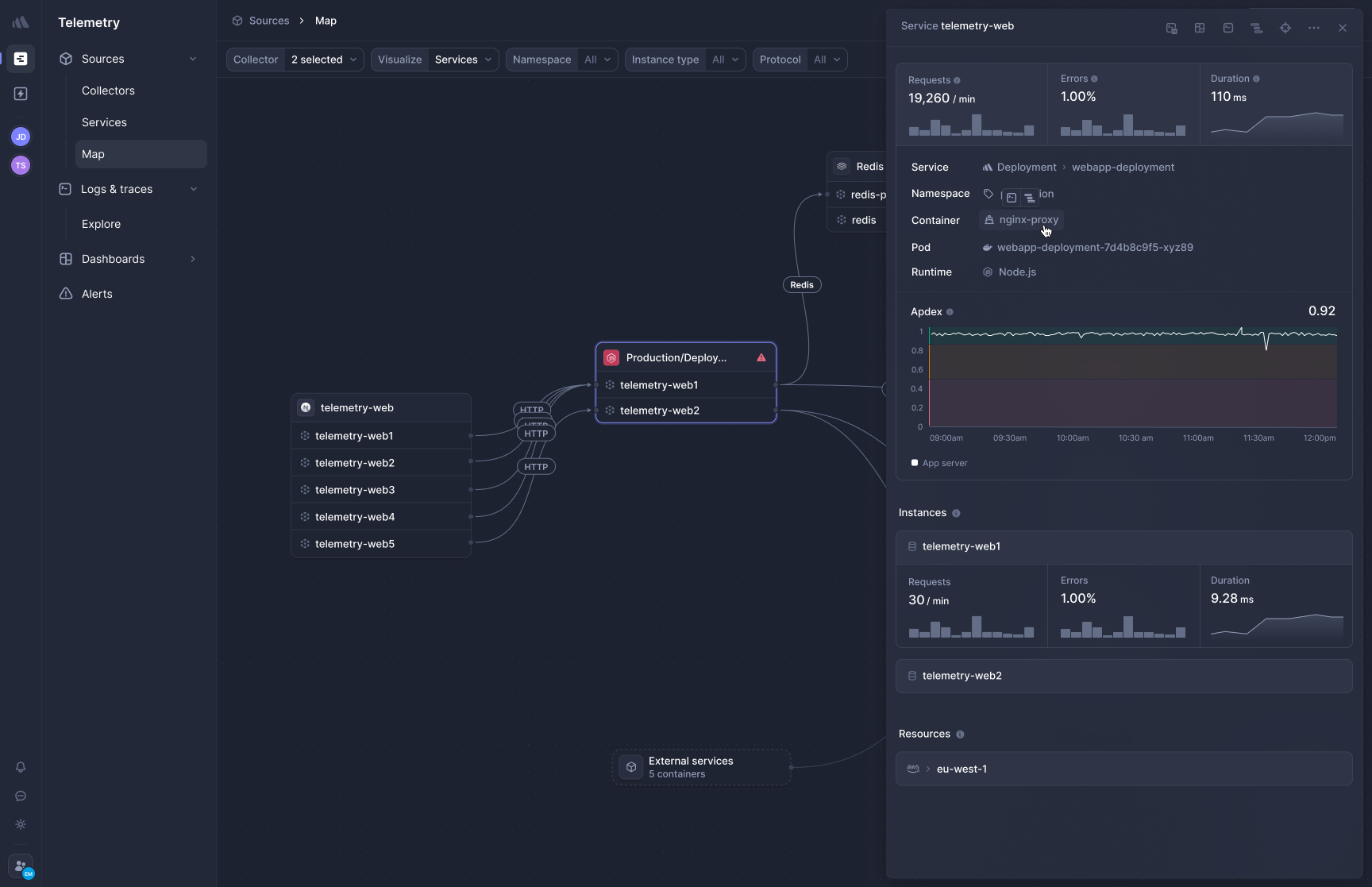
[Better Stack's APM](https://betterstack.com/tracing) captures distributed traces using eBPF, so you don't need to install SDKs or touch your application code. Deploy the collector to Kubernetes or Docker and HTTP/gRPC traffic between your services is captured immediately. Queries to PostgreSQL, MySQL, Redis, and MongoDB are traced automatically too.
**Frontend-to-backend correlation** changes how you debug performance issues. When a user reports a slow page load, you can trace that request from the browser through every microservice call and database query in a single view. You're not switching between your RUM tool and your APM tool and mentally stitching together what happened.
**OpenTelemetry-native, zero lock-in.** Your traces are stored in OTel format. If you ever decide to change observability vendors, you update a configuration line. You don't have to rip out proprietary instrumentation across every service in your stack.
If you have 30 microservices running across three languages today, how many of them actually have complete APM instrumentation? When instrumentation requires manual SDK setup per service, services tend to get skipped, especially the older ones that nobody wants to touch. eBPF removes that friction entirely.
### OnPage
OnPage has no APM capability and doesn't collect distributed traces. If you need application performance monitoring alongside OnPage, you'll need a separate tool for it. How many separate tools are you currently juggling between detection and resolution, and what does it cost in engineering time to maintain all those integrations?
| APM feature | Better Stack | OnPage |
|-----------------|--------------|--------|
| **Distributed tracing** | Yes (eBPF, zero code) | No |
| **Frontend-to-backend correlation** | Yes (unified interface) | No |
| **OpenTelemetry support** | Native, first-class | No |
| **Database auto-instrumentation** | Yes (Postgres, MySQL, Redis, Mongo) | No |
| **Code-level profiling** | No | No |
---
## Incident alert management
This section is about the full incident lifecycle, from the moment something goes wrong to the moment it's resolved and documented.
### Better Stack: detection through resolution
Better Stack handles the whole arc in one place. Your monitors watch your metrics, logs, traces, and uptime checks. When something crosses a threshold, the on-call person gets paged. The incident gets a dedicated Slack channel. The AI SRE starts investigating automatically. When it's over, a post-mortem is generated from the actual timeline data.
What makes this coherent rather than just a bundle of features is that every step shares the same underlying data. The monitor that fired references the exact query that triggered it. The Slack incident channel can run log and trace queries directly. The post-mortem timeline is built from real telemetry events, not from notes someone typed after the fact.
Auto-generated post-mortems from incident timelines:
### OnPage: notification routing layer
OnPage's role in the incident lifecycle starts after something else has already detected the problem. Your monitoring tool identifies an anomaly, pushes an alert to OnPage via webhook or API, and OnPage routes it to whoever is on call based on your schedule and escalation policy. The responder acknowledges in the app and the alert resolves in OnPage.
The web console gives you post-incident reports with response times, escalation paths, and alert volumes. For compliance-heavy environments, the six-year data retention available on Enterprise tiers and the full timestamped audit trails matter for regulatory requirements that demand documented response records.
OnPage's real strengths in this layer are HIPAA compliance, the persistent notification mechanism, and the two-way dispatcher console. In a hospital environment, where a dispatcher needs to coordinate multiple clinical staff during a critical event, the combination of mass notifications via BlastIT, two-way messaging, and role-based contact directories handles workflows that most IT-focused alerting tools weren't designed for.
| Incident management | Better Stack | OnPage |
|--------------------|--------------|--------|
| **Alert detection** | Native (logs, metrics, traces, uptime) | Via external integration |
| **On-call routing** | Yes | Yes |
| **Persistent mobile alerts** | Yes | Yes (up to 8 hours) |
| **Slack/Teams native** | Yes | Notification delivery only |
| **AI incident investigation** | Yes (AI SRE) | No |
| **Post-mortems** | Automatic (from timeline data) | Post-incident reports |
| **Mass notifications** | No | Yes (BlastIT) |
| **HIPAA compliance** | No | Yes |
| **Dispatcher console** | No | Yes (two-way, web-based) |
| **Data retention for compliance** | Standard retention policies | Up to 6 years (Enterprise) |
---
## Uptime monitoring and status pages
### Better Stack
Uptime monitoring and status pages are included in the platform with no separate licensing required. Checks run globally, and a downtime event triggers the same on-call workflow as any other alert.
[Better Stack Status Pages](https://betterstack.com/status-page) syncs automatically with incident management, so when an outage starts, your public status page updates alongside your internal incident response:
You get public and private pages, custom branding, subscriber notifications via email and SMS, scheduled maintenance windows, and automatic incident timeline publishing. Your customers find out about outages from you, not from their Twitter feed.
### OnPage
OnPage doesn't have status page functionality. If you're using OnPage as your alerting layer, you'll need a separate tool to communicate outages to your customers. Is your team currently managing incident response in OnPage while someone else manually updates a status page in a different tab? That dual-track process is one of the friction points Better Stack eliminates entirely.
| Status pages | Better Stack | OnPage |
|--------------|--------------|--------|
| **Status pages** | Yes (included) | No |
| **Subscriber notifications** | Email, SMS, Slack, webhook | N/A |
| **Incident sync** | Automatic | N/A |
| **Custom branding** | Yes | N/A |
| **Uptime monitoring** | Yes (global checks) | No |
---
## Integrations and deployment
How you get data in and alerts out differs fundamentally between these platforms, and that difference extends to how each one fits into an existing stack.
### Better Stack
Better Stack integrates natively with observability and DevOps tooling: 100+ covering all major stacks: MCP, OpenTelemetry, Vector, Prometheus, Kubernetes, Docker, PostgreSQL, MySQL, Redis, MongoDB, Nginx, and more. The [MCP server](https://betterstack.com/docs/getting-started/integrations/mcp/) connects Claude, Cursor, and other AI assistants directly to your observability data so you can query your stack through natural language.
Here's an overview of how data collection works across sources:
If you're already running OTel collectors in your stack, the OpenTelemetry integration drops in without any rearchitecting:
If you use Vector for log processing, it works natively too:
Deployment is a single Helm chart. Once the collector is running as a DaemonSet on your nodes, services are discovered automatically. Add new services next quarter and they appear in Better Stack without any additional configuration.
### OnPage
OnPage integrates differently because it serves a different role. Rather than being a data destination, it's an alert receiver. Your monitoring tools, RMM platforms (NinjaOne, ConnectWise, Datto), PSA platforms (ServiceNow, ConnectWise Manage), and EHR systems push alerts into OnPage via API, email parsing, or native integrations.
The breadth of protocol support is worth noting if you're in healthcare or running legacy infrastructure. OnPage supports REST, Hub API, WCTP, SNPP, TAP, and SOAP. SNPP and WCTP are the standards that physical pager networks use, so if you're migrating from hardware pagers to digital alerting, you can bridge old and new systems during the transition without replacing everything at once.
For most IT operations use cases though, the relevant integration path is simpler: monitoring tool detects anomaly, posts to OnPage via webhook, OnPage routes to on-call. This works well and is well-documented. But it does mean the context from your monitoring tool doesn't follow the alert into OnPage. Do you find yourself opening OnPage to acknowledge an alert and then immediately opening a second tool to understand what it's actually telling you? That extra step compounds across every incident you handle. Is that a workflow you want to keep paying for?

| Integrations | Better Stack | OnPage |
|-------------|--------------|--------|
| **OpenTelemetry** | Native (first-class) | No |
| **Prometheus/PromQL** | Yes | No |
| **Kubernetes** | Yes (auto-discovery) | No |
| **RMM tools** | Via API | Yes (NinjaOne, ConnectWise, Datto) |
| **PSA tools** | Via API | Yes (ServiceNow, ConnectWise Manage) |
| **EHR systems** | No | Yes (clinical integrations) |
| **Legacy pager protocols** | No | Yes (SNPP, WCTP, TAP, SOAP) |
| **IoT sensors** | Via OpenTelemetry | Yes (direct integration) |
| **MCP server** | Yes (GA, all customers) | No |
| **REST API** | Yes | Yes |
| **Deployment complexity** | Helm chart, auto-discovery | App install + admin console setup |
---
## AI capabilities
### Better Stack: AI SRE and MCP server
The AI SRE activates automatically when an incident fires. It queries your service map, reviews recent logs, checks what changed in recent deployments, and delivers a structured root cause hypothesis before you've even opened the incident. At 3am, the difference between starting from a hypothesis and starting from zero is significant.
The [MCP server](https://betterstack.com/docs/getting-started/integrations/mcp/) is generally available to all customers. Once it's configured, your AI assistant can query your full observability stack directly rather than working from log snippets you paste into a chat window:
Setup is one configuration block:
```json
{
"mcpServers": {
"betterstack": {
"type": "http",
"url": "https://mcp.betterstack.com"
}
}
}
```
From there you can ask your AI assistant things like "show me all monitors currently down," "who's on call right now," or "build a query to find HTTP 500 errors in the last hour." You can also scope access to read-only operations to prevent anything destructive.
### OnPage
OnPage doesn't currently have AI-powered incident investigation, an AI SRE, or an MCP server. The 2025 updates focused on mobile app improvements and enterprise management console enhancements. For organizations whose main requirement is reliable alert routing, the absence of AI features may not matter much. But if you want AI-assisted investigation as part of how you handle incidents, this is a real gap.
| AI capability | Better Stack | OnPage |
|---------------|--------------|--------|
| **AI incident investigation** | Yes (autonomous, no prompting required) | No |
| **MCP server** | Yes (GA, all customers) | No |
| **Natural language log queries** | Yes (via MCP) | No |
| **AI coding integration** | Claude Code + Cursor | No |
---
## User experience and interface
### Better Stack
Better Stack's interface is designed around investigation. One view shows your logs, metrics, traces, service maps, and on-call status together. When an alert fires, you're not navigating between tabs to assemble a picture. The data that explains the alert is already visible.
You can customize your workspace to match how you actually work:
The investigation path is short. An alert fires, you open the incident, you see the service map with the relevant logs and trace examples in the same view, and you click into the trace that looks suspicious. The whole path from alert to useful context typically takes under 30 seconds and two or three clicks.
New team members get productive quickly because the SQL-based query interface doesn't require learning a proprietary syntax. If you know basic SQL, you can query your logs on day one.
### OnPage
OnPage's interface is optimized for alert management and schedule administration, not for telemetry investigation. G2 reviewers consistently highlight how quickly you can set up a full year of on-call schedules, even complex ones with week-by-week variations across a large team. That's a real capability.
The mobile app is also consistently praised for its simplicity. Install it, register, and you're receiving alerts within a few minutes. The persistent notification mechanism reliably overrides do-not-disturb on both Android and iOS, which is the thing most of its users are actually paying for.
Where the interface doesn't serve you as a software engineer is that there's nothing to investigate in it. OnPage shows you that an alert fired, when it was acknowledged, and by whom. It doesn't surface why the condition occurred or what your systems were doing when it happened. That investigation starts in a separate tool. If you're spending more than a few minutes per incident gathering that context before you can start fixing anything, the workflow cost of that extra step is real even if it doesn't show up on your OnPage invoice.
| UX aspect | Better Stack | OnPage |
|-----------|--------------|--------|
| **Primary interface** | Web + Slack (investigation-focused) | Mobile app + web console (alert-focused) |
| **Onboarding time** | Hours (eBPF auto-discovery) | Minutes (app install) |
| **Query language** | SQL + PromQL (universal) | None (no data queries) |
| **Investigation clicks** | 2-3 from alert to context | N/A (context lives elsewhere) |
| **Schedule management** | Yes (timezone-aware) | Yes (multi-year, exception support) |
| **Mobile experience** | Alert + acknowledgment | Full platform on mobile |
| **G2 sentiment** | Positive on unified data access | Positive on reliability and scheduling ease |
---
## Compliance and security
This is the clearest area where OnPage leads, and specifically for healthcare it's not close.
### OnPage: HIPAA-native
OnPage was designed for healthcare from the start. HIPAA compliance isn't bolted on as a feature: it runs through the encryption layer, the message handling logic, the audit trail structure, and the data retention policies. For clinical environments where patient data can appear in alert messages, that's not a checkbox, it's a prerequisite.
The full compliance posture: SOC 2 certified facility, ISO 27001-certified facility, HIPAA compliant, PCI certified, GDPR compliant, pen tested annually.
### Better Stack: SOC 2 and GDPR, no HIPAA
Better Stack is SOC 2 Type II certified and GDPR compliant. It offers SSO via Okta, Azure, and Google; SCIM provisioning; RBAC; audit logs; and data residency in EU and US regions. For most engineering and IT operations use cases, this is sufficient.
Better Stack doesn't have HIPAA compliance. If your environment involves clinical communication, patient data in alerts, or any scenario where Protected Health Information could appear in your logs or alert messages, OnPage is the compliant option. Does your legal or compliance team require HIPAA certification from every tool that touches patient-adjacent workflows? If so, that single requirement may resolve the decision entirely.
| Compliance | Better Stack | OnPage |
|-----------|--------------|--------|
| **SOC 2 Type II** | Yes | Yes |
| **GDPR** | Yes | Yes |
| **HIPAA** | No | Yes |
| **ISO 27001** | Yes (data centers) | Yes |
| **PCI** | No | Yes |
| **Encryption** | AES-256 at rest, TLS in transit | SSL encrypted |
| **Audit trails** | Yes | Yes (with timestamps) |
| **Data retention** | Standard policies | Up to 6 years (Enterprise) |
---
## Enterprise readiness
Both platforms have enterprise customers, but the enterprise profiles look very different.
OnPage's enterprise customers tend to be hospital systems, large healthcare networks, managed service providers handling multiple client environments, and public safety organizations. The enterprise features they need, things like HIPAA, six-year data retention, mass notifications, and legacy protocol support, are all present.
Better Stack's enterprise customers tend to be engineering-led organizations running modern software infrastructure. The enterprise features they need, SSO, SCIM, RBAC, audit logs, data residency, SLAs, and direct support access, are also present.
| Enterprise feature | Better Stack | OnPage |
|-------------------|--------------|--------|
| **SSO (SAML/OIDC)** | Yes (Okta, Azure, Google) | No (not listed in plans) |
| **SCIM provisioning** | Yes | No |
| **RBAC** | Yes | Yes (data restrictions, Enterprise) |
| **Audit logs** | Yes | Yes (timestamped, 6-year retention) |
| **Data residency** | EU + US, optional S3 bucket | Not specified |
| **Dedicated support channel** | Slack channel + account manager | Dedicated customer success (Enterprise Gold) |
| **SLA** | Enterprise SLA available | Standard + Enhanced SLA tiers |
| **HIPAA compliance** | No | Yes |
| **Mass notification** | No | Yes (BlastIT) |
| **Legacy protocol support** | No | Yes (SNPP, WCTP, TAP, SOAP) |
---
## Final thoughts
The decision here is cleaner than most platform comparisons because the two products serve meaningfully different use cases.
If you're in healthcare, or in any environment where HIPAA compliance is required, OnPage is the tool. Better Stack doesn't have HIPAA compliance and that's not something you can work around. OnPage was built for clinical communication from the beginning, and that shows in the feature set: the persistent mobile alerts, the role-based contact directories, the mass notification capability, the dispatcher console. If you're replacing pagers in a hospital system or running a NOC that sits on top of existing monitoring infrastructure you're not replacing, OnPage makes sense.
If you're an engineering team, a DevOps organization, or an IT operations group running modern software infrastructure, Better Stack is the more complete platform. **You get logs, metrics, traces, uptime monitoring, real user monitoring, error tracking, on-call alerting, and status pages in one place at a predictable cost**. The AI SRE and MCP server add investigation capabilities that OnPage simply doesn't offer. And the lack of HIPAA, if your environment doesn't require it, is simply not relevant.
What would your workflow look like if the logs, traces, and metrics relevant to an incident were already visible when you acknowledged the alert? And what would you do with the budget freed up by collapsing four or five tools into one?
Ready to see the difference? [Start your Better Stack free trial](https://betterstack.com) and have your first alerts running within the hour.