# Better Stack vs Loggly: full-stack observability vs log management in 2026
Loggly started as a cloud-native log management tool before most teams had heard the term "observability." It was one of the first SaaS log platforms that let you ship logs without installing agents, search them in a browser, and set up alerts in minutes. SolarWinds acquired it in 2018, and it now sits alongside AppOptics (infrastructure and APM) and Pingdom (synthetic and real user monitoring) under the SolarWinds Observability umbrella.
The **problem surfaces when your monitoring needs grow. Loggly handles logs. AppOptics handles metrics and traces**. Pingdom handles uptime and RUM. Each is a separate product with its own pricing, its own login, its own query interface. Need to correlate a spike in error logs with a slow database query and a user-facing latency increase? **You are navigating three different tools, three different billing dimensions**, and three different mental models.
**Better Stack replaces that entire stack with a single platform**: logs, metrics, distributed traces, error tracking, incident management, status pages, and real user monitoring, all in one interface, one query language, and one bill. It collects telemetry with an eBPF collector that requires zero code changes, stores everything in a unified data warehouse, and lets you query all of it with SQL or PromQL.
**If you want a modern observability platform that grows with your infrastructure, Better Stack is the stronger choice.** If your needs genuinely start and end with basic log aggregation for a small application, Loggly's free tier and low entry price might be enough. This comparison covers both sides honestly so you can decide which one fits.
## Quick comparison at a glance
| Category | Better Stack | Loggly (SolarWinds) |
|----------|-------------|---------------------|
| **Scope** | Logs, metrics, traces, errors, incidents, status pages, RUM | Logs only (APM/metrics/RUM via separate SolarWinds products) |
| **Instrumentation** | eBPF auto-instrumentation (zero code changes) | Agentless log shipping (syslog, HTTP, libraries) |
| **Query language** | SQL + PromQL (unified across all telemetry) | Lucene-based search (Elasticsearch under the hood) |
| **Data model** | Unified warehouse (all telemetry together) | Logs only; metrics/traces in separate AppOptics product |
| **Pricing model** | Data volume + responders | Daily volume tiers ($79-$279+/month) |
| **Retention** | Configurable, up to years | 7-90 days depending on plan |
| **OpenTelemetry** | Native, first-class support | Not supported in Loggly (limited in AppOptics) |
| **AI features** | AI SRE + MCP server (GA) | Automated log summaries (basic) |
| **Incident management** | Built-in (phone/SMS, on-call, escalation) | Not included (requires PagerDuty or similar) |
| **Status pages** | Built-in | Not included |
| **Enterprise** | SOC 2 Type II, GDPR, SSO, SCIM, RBAC, audit logs | SOC 2 Type II, GDPR; SSO at Enterprise tier only |
## Platform architecture
Loggly and Better Stack represent two fundamentally different philosophies about what an observability platform should be. Loggly is a log management tool. Better Stack is a full observability platform. That distinction shapes everything else in this comparison: what you can do during an incident, how many tools you need, and what your total bill looks like.
### Better Stack: unified from the ground up
Better Stack's architecture brings three things together that Loggly separates across products (or doesn't offer at all): kernel-level data collection, unified storage, and a single query interface.
The **eBPF collector** runs at the kernel level, capturing distributed traces, logs, and infrastructure metrics from Kubernetes and Docker workloads without any application code changes. Deploy a DaemonSet, and the collector discovers services, instruments database queries (PostgreSQL, MySQL, Redis, MongoDB), and builds distributed trace maps automatically.
The **unified data warehouse** stores logs, metrics, and traces as wide events in the same backend. Want to correlate a log error with the trace that produced it and the infrastructure metric that spiked at the same time? One query, one interface, no product switching. SQL and PromQL both work across the entire dataset.
Why does this matter compared to Loggly? Because when something breaks, the difference between "search logs in Loggly, switch to AppOptics for metrics, check Pingdom for uptime" and "everything is right here" is measured in minutes of downtime.

### Loggly: logs as a standalone product
Loggly is built on Elasticsearch and Apache Kafka. Logs flow in through syslog, HTTPS endpoints, or language-specific libraries (no proprietary agent required, which is a genuine advantage for teams that want minimal footprint). The platform parses logs automatically, indexes them, and makes them searchable through a Lucene-based query interface.
The trade-off is scope. Loggly is a log management tool, not an observability platform. Need infrastructure metrics? That's AppOptics ($9.99-$24.99/host/month, billed separately). Need distributed tracing? Also AppOptics. Need uptime monitoring or real user monitoring? That's Pingdom (billed separately again). Need incident management with phone alerts and on-call scheduling? You will need PagerDuty or OpsGenie on top of everything else.
Each SolarWinds product has its own dashboard, its own pricing page, its own support experience. SolarWinds is working on unifying these under SolarWinds Observability SaaS, but the underlying products remain distinct. If you are investigating an incident across logs, metrics, and traces, you are still moving between different interfaces.

| Architecture aspect | Better Stack | Loggly |
|---------------------|--------------|--------|
| **Data collection** | eBPF (kernel-level, zero code) | Syslog/HTTPS (agentless, log-only) |
| **Storage model** | Unified warehouse (logs, metrics, traces) | Elasticsearch (logs only) |
| **Query language** | SQL + PromQL (universal) | Lucene-based search |
| **Metrics** | Built-in | Separate product (AppOptics) |
| **Traces** | Built-in | Separate product (AppOptics) |
| **RUM** | Built-in | Separate product (Pingdom) |
| **Time to full observability** | Hours (single deployment) | Weeks (multiple products to configure) |
| **Data ownership** | Host in your S3 bucket (optional) | S3 archiving available (Pro tier and above) |
## Pricing comparison
This is where the comparison gets interesting, because Loggly's pricing looks affordable at first glance. $79/month for the Standard plan, $159 for Pro, $279 for Enterprise. But those numbers come with strict daily volume caps and short retention periods. Once you factor in the cost of AppOptics for metrics/APM, Pingdom for monitoring, and PagerDuty for incident management, the "affordable log tool" becomes an expensive multi-product stack.
### Better Stack: volume-based, everything included
Better Stack charges for data volume and responders. The pricing formula does not change based on which features you use. Logs, metrics, traces, error tracking, incident management, and status pages are all part of the same bill.
**Pricing structure:**
- Logs: $0.10/GB ingestion + $0.05/GB/month retention (all searchable)
- Traces: $0.10/GB ingestion + $0.05/GB/month retention
- Metrics: $0.50/GB/month
- Error tracking: $0.000050 per exception
- Responders: $29/month (unlimited phone/SMS)
- Monitors: $0.21/month each
**Example: team producing 30GB of logs per day (roughly 900GB/month):**
- Log ingestion: $90/month
- Log retention: $45/month
- 5 Responders: $145/month
- 50 Monitors: $10.50/month
- **Total: approximately $291/month** for logs, incident management, and monitoring
That total includes incident management with unlimited phone/SMS alerts, on-call scheduling, and escalation policies. No separate tool needed.
### Loggly: daily volume tiers with feature gating
Loggly prices by daily volume tier, billed monthly or annually. The published plans are:
- **Lite (Free):** 200 MB/day, 7-day retention, basic search and filters
- **Standard ($79/month):** 1 GB/day, 15-day retention, dashboards, email-only alerts
- **Pro ($159/month):** Plans up to 100 GB/day, 15-30 day retention, webhook alerts, S3 archiving, API access
- **Enterprise ($279/month):** Custom volume, 15-90 day retention, anomaly detection, JIRA/GitHub integration, RBAC, federated identity
These prices cover log management only. They do not include infrastructure monitoring, APM, uptime monitoring, or incident management.
**The same 30GB/day team on Loggly + SolarWinds stack:**
- Loggly Enterprise (custom volume for 30GB/day): $279+/month (likely higher for custom volume)
- AppOptics for 20 hosts (infrastructure + APM at $24.99/host): $500/month
- Pingdom for uptime monitoring: ~$42/month (Starter plan)
- PagerDuty for incident management (5 users at Professional): ~$245/month
- **Total: approximately $1,066+/month**
That is **3-4x the cost of Better Stack for comparable coverage. And you are managing four separate products**, four logins, four billing cycles. What would your team do with the hours spent managing tool integrations instead of investigating incidents?
### Cost comparison: 3-year TCO
For a mid-size team (30GB logs/day, 20 hosts, 5 responders) over 3 years:
| Category | Better Stack | Loggly + SolarWinds stack |
|----------|-------------|---------------------------|
| Log management | $4,860 | $10,044+ |
| Infrastructure/APM | Included | $18,000 |
| Uptime/RUM | Included | $1,512 |
| Incident management | $5,220 | $8,820 |
| Engineering overhead (integration) | $0 | $15,000+ |
| **Total** | **$10,080** | **$53,376+** |
Better Stack saves approximately $43,000 over three years while providing a single, unified platform instead of four separate tools. The engineering overhead line is real: maintaining integrations between Loggly, AppOptics, Pingdom, and PagerDuty (keeping webhooks working, syncing alert rules, correlating data across products) costs engineering time that has a dollar value.

## Log management and analytics
Both platforms handle log ingestion, search, and alerting. The differences are in query power, retention flexibility, searchability, and how logs connect to the rest of your telemetry.
### Better Stack: SQL-native log management
[Better Stack logs](https://betterstack.com/logs) stores all ingested logs as structured data and makes 100% of them searchable immediately. There is no tiering, no indexing decision, and no concept of "archived but unsearchable" logs. Every log line that enters Better Stack can be queried with SQL or PromQL at any time during its retention period.
The SQL interface makes analytics feel natural to anyone who has used a database:
```sql
SELECT
host,
COUNT(*) as error_count,
MAX(response_time_ms) as peak_latency
FROM logs
WHERE level = 'error'
AND timestamp > NOW() - INTERVAL '30 minutes'
GROUP BY host
ORDER BY error_count DESC
```
That same SQL can power dashboards and charts directly. Watch how queries become visual dashboards:
Retention is configurable and priced transparently at $0.05/GB/month. Want to keep logs for a year? You can. Two years? Also fine. Loggly caps retention at 90 days even on the Enterprise plan, and expanding that requires custom negotiation. For teams in regulated industries or teams that want to analyze long-term trends, that 90-day ceiling is a hard constraint.
For teams that query the same filters repeatedly, Better Stack lets you save presets for quick access:
### Loggly: established log management with Elasticsearch
Loggly's log management is mature and well-understood. The platform uses Elasticsearch under the hood, which means search is fast and supports complex queries through Lucene syntax. The Dynamic Field Explorer automatically parses incoming logs and presents a navigable field map, which is genuinely helpful when you are exploring unfamiliar log structures.
Loggly's strengths for log management specifically include agentless collection via syslog and HTTPS (no software to install on your servers), automated parsing of common log formats, and surround search that shows related events around a given log line. The free Lite tier (200 MB/day, 7 days retention) is a real on-ramp for small projects.
The limitations show up as scale increases. The Standard plan caps you at 1GB/day. Pro plans scale up to 100GB/day but with escalating costs. Enterprise offers custom volume but requires contacting sales. Retention is 7 days on Lite, 15 days on Standard, 15-30 on Pro, and 15-90 on Enterprise. If you need to search logs from four months ago, Loggly cannot help you unless you have been archiving to S3 and have your own tooling to query those archives.
Does your team ever find itself in an incident wishing you could search logs from last quarter? That is the retention ceiling making itself felt.
Alerting on the Standard plan is email-only. Webhook alerts (for PagerDuty, Slack, VictorOps integration) require the Pro plan at $159/month. Anomaly detection is Enterprise-only at $279/month. Features that Better Stack includes at every tier are gated behind Loggly's higher plans.

| Log management | Better Stack | Loggly |
|----------------|--------------|--------|
| **Query language** | SQL + PromQL | Lucene-based search |
| **Searchability** | 100% of ingested logs | 100% within retention window |
| **Max retention** | Unlimited (configurable) | 90 days (Enterprise) |
| **Alerting** | All plans | Email-only (Standard), webhooks (Pro+) |
| **Anomaly detection** | Available | Enterprise only ($279+/month) |
| **Trace correlation** | Automatic (same warehouse) | Not available (separate product) |
| **S3 archiving** | Built-in, optional self-hosted | Pro and Enterprise only |
| **Daily volume caps** | None (pay per GB) | 200MB-100GB depending on plan |
## Infrastructure monitoring
Loggly itself does not monitor infrastructure. If you want host metrics, container metrics, or custom application metrics, you need SolarWinds AppOptics, a separate product with its own pricing ($9.99-$24.99/host/month), its own agent, and its own dashboard.
### Better Stack: metrics without a separate product
[Better Stack metrics](https://betterstack.com/infrastructure-monitoring) captures infrastructure metrics through the same eBPF collector that handles logs and traces. CPU, memory, disk, network, and container metrics flow into the unified warehouse alongside everything else. No separate agent, no separate pricing dimension, no cardinality penalties.
Better Stack supports full PromQL for metrics queries, which means Prometheus users can bring their existing knowledge directly:
Prefer a visual approach? Better Stack also has a drag-and-drop chart builder:
Pricing is $0.50/GB/month with no cardinality penalties. Add as many tags and label combinations as your analysis requires. The cost does not change based on unique metric combinations, which eliminates the "cardinality anxiety" that per-metric pricing creates.
### Loggly + AppOptics: metrics as a separate purchase
AppOptics provides infrastructure monitoring starting at $9.99/host/month for infrastructure-only, or $24.99/host/month for infrastructure plus APM. It supports over 150 integrations and offers host maps, container monitoring, and custom metrics via API.
AppOptics is a capable tool. Its service maps, distributed transaction tracing, and code-level exception tracking are well-regarded. The issue is not quality but fragmentation. Your metrics live in AppOptics. Your logs live in Loggly. Correlating a CPU spike in AppOptics with the error logs in Loggly requires switching between products and manually lining up timestamps. How much time does your team spend tab-switching between monitoring tools during incidents?
| Metrics | Better Stack | Loggly + AppOptics |
|---------|--------------|-------------------|
| **Availability** | Built-in | Separate product ($9.99-$24.99/host/month) |
| **Collection method** | eBPF collector (same as logs/traces) | AppOptics agent (separate install) |
| **Query language** | SQL + PromQL | AppOptics-specific interface |
| **Cardinality pricing** | No penalties | Not documented |
| **Log correlation** | Automatic (same warehouse) | Manual (cross-product) |
| **Prometheus compatible** | Native PromQL | Limited |
| **Container monitoring** | Included | $0.06/container hour (AppOptics) |
## Application performance monitoring
Distributed tracing and APM are not part of Loggly. They require AppOptics at the $24.99/host/month tier. Better Stack includes APM as part of the unified platform with zero additional cost.
### Better Stack: eBPF-based APM
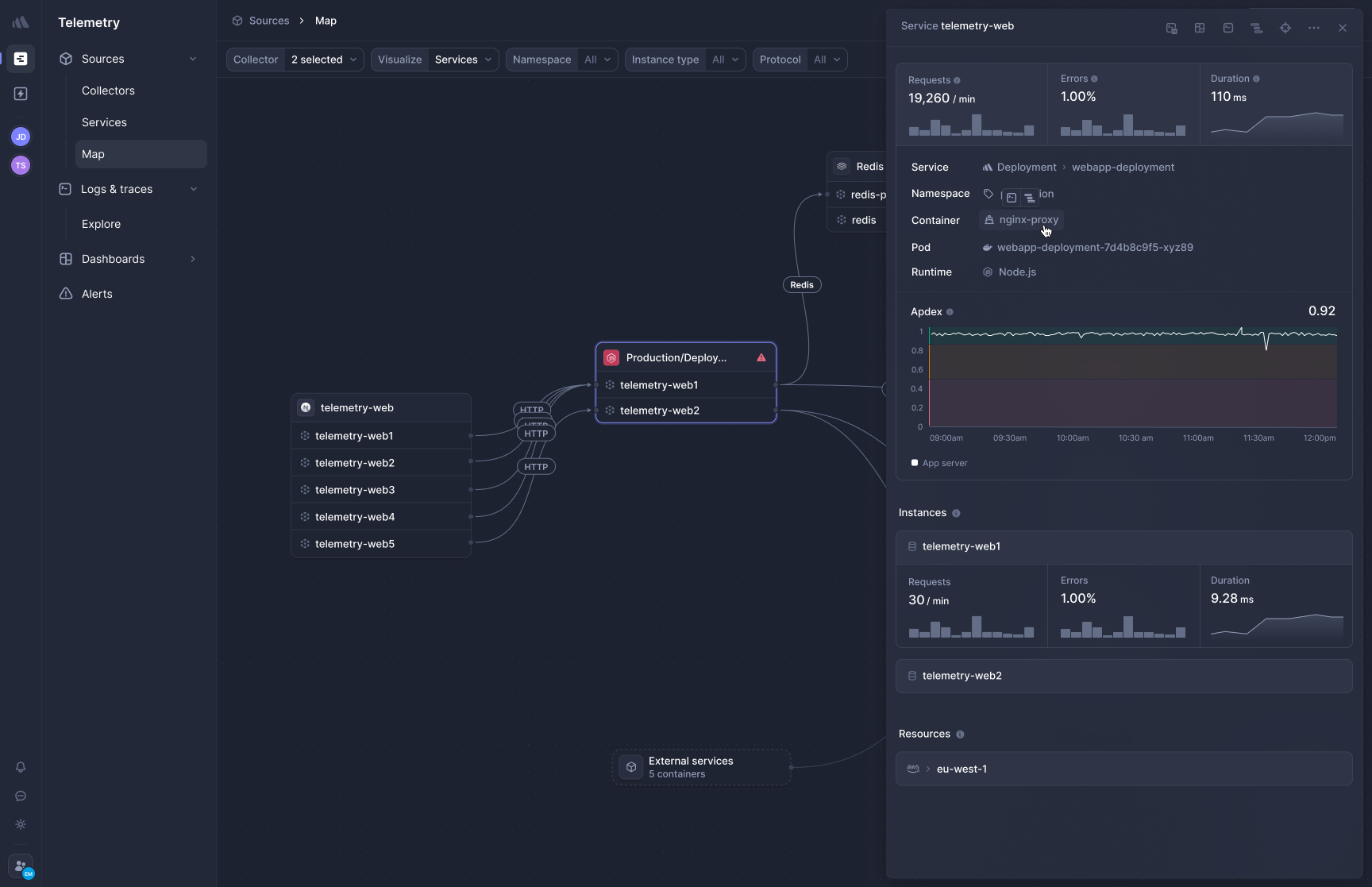
[Better Stack's APM](https://betterstack.com/tracing) captures distributed traces at the kernel level using eBPF. No SDK installation per service, no language-specific tracing libraries, no sampling decisions to manage costs. Deploy the collector and HTTP/gRPC traffic between services appears in trace views automatically.
**Frontend-to-backend correlation** connects browser-side performance with backend service behavior. A slow page load traces all the way through your microservices and database calls in a single view. No switching between a RUM product and an APM product.
**OpenTelemetry-native, zero lock-in.** Better Stack treats OpenTelemetry as the native data format. Your instrumentation uses open standards, which means you own your data. Want to send traces somewhere else? Change a configuration line, not your codebase. No proprietary agents, no SDK lock-in.
This matters if you are currently using AppOptics and considering your options. AppOptics uses its own agent and instrumentation libraries. Moving away from it means reworking instrumentation across every service. With Better Stack, that migration tax never accumulates because the instrumentation is standard from day one.
### Loggly + AppOptics: SDK-based APM as a separate product

AppOptics provides APM with distributed transaction tracing, code-level exception tracking, and service maps. It supports Java, .NET, Ruby, Python, Scala, Node.js, and PHP through language-specific agents. At $24.99/host/month (infrastructure + APM bundle), it is priced affordably compared to platforms like Datadog or New Relic.
The APM capabilities are genuine. AppOptics shows end-to-end request flow across services, identifies bottlenecks with heat maps, and provides auto-instrumented root cause analysis. For teams already in the SolarWinds ecosystem, it is a natural addition.
The limitation is integration depth. AppOptics traces do not live in the same data store as Loggly logs. You can add trace context to logs to link them, but the actual investigation still involves navigating between two separate interfaces. Better Stack eliminates that gap entirely because traces and logs sit in the same warehouse.
Does your team find it frustrating to switch between tools when tracing a request from the frontend through backend services? That context-switching cost adds up during every incident.
| APM feature | Better Stack | Loggly + AppOptics |
|-------------|--------------|-------------------|
| **Instrumentation** | eBPF (zero code changes) | Language-specific agents |
| **Included in platform** | Yes | No ($24.99/host/month additional) |
| **Frontend-to-backend** | Unified view | Not integrated with Loggly/Pingdom |
| **OpenTelemetry** | Native, first-class | Limited support in AppOptics |
| **Database tracing** | Automatic (Postgres, MySQL, Redis, Mongo) | Supported via agent instrumentation |
| **Data portability** | Full (OTel format) | AppOptics-specific format |
| **Code-level profiling** | Network-level | Code-level exception tracking |
## Digital experience monitoring (powered by Pingdom)
Loggly's nav menu includes "Digital Experience Monitoring" powered by SolarWinds Pingdom. This covers synthetic monitoring (uptime checks, page speed tests, transaction monitoring) and basic real user monitoring. It is a third separate product with its own pricing.
### Better Stack: RUM built into the platform

Better Stack RUM captures frontend sessions, JavaScript errors, Core Web Vitals (LCP, CLS, INP), session replays, and website analytics. Because it sits in the same data warehouse as your backend telemetry, frontend events link directly to backend traces and infrastructure metrics in a single query interface.
Session replay includes rage click and dead click detection, 2x speed playback with automatic pause-skipping, and SDK-level PII exclusion. Website analytics tracks referrers, UTM campaigns, entry/exit pages, and locales in real time. Product analytics with auto-captured user events and funnel analysis let you define what matters retroactively.
Error tracking is built in. A session replay links directly to the JavaScript error and the distributed backend trace that occurred during that session. One view, three data types, no product switching.
**Pricing:** $0.00150/session replay, volume-based. For 5M web events and 50K session replays, approximately $102/month.
### Loggly + Pingdom: synthetic and RUM as a separate product

Pingdom offers synthetic monitoring with 100+ probe servers worldwide for uptime checks, page speed analysis, and transaction monitoring. Its RUM provides geographic heat maps and real-time visitor filtering. The product has been around since 2007 and has a strong reputation for reliability.
The disconnect is the same pattern: **Pingdom is a separate product. A slow page load detected by Pingdom requires you to switch to Loggly for error logs and then to AppOptics for the backend trace**. That investigation flow spans three tools with three query interfaces.
Pingdom's RUM also does not include session replay, product analytics, or funnel analysis. If you need those capabilities, you are adding a fourth tool (PostHog, Sentry, or similar) to the stack.
| Digital experience | Better Stack | Loggly + Pingdom |
|-------------------|--------------|------------------|
| **Included in platform** | Yes | No (separate Pingdom purchase) |
| **Session replay** | Yes | No |
| **Core Web Vitals** | Yes (LCP, CLS, INP) | Page speed metrics |
| **Website analytics** | Yes (referrers, UTM, locales) | Limited |
| **Product analytics / funnels** | Yes | No |
| **Synthetic monitoring** | Yes | Yes (100+ global probes) |
| **Backend correlation** | Automatic (same warehouse) | Manual (cross-product) |
| **Error tracking** | Built-in, linked to replays | Not included |
## Incident management
Loggly does not include incident management. It can send alert notifications (email on Standard, webhooks on Pro+), but on-call scheduling, phone/SMS alerts, escalation policies, and post-mortem generation are not part of the product. Most Loggly teams integrate PagerDuty ($49-$83/user/month) or OpsGenie for these workflows.
### Better Stack: end-to-end incident response
[Better Stack incident management](https://betterstack.com/incident-management) handles the full incident lifecycle at $29/month per responder. That includes unlimited phone/SMS alerts, on-call scheduling, multi-tier escalation policies, Slack/Teams-native incident channels, and automatic post-mortem generation.
Teams that manage incidents in Slack get dedicated incident channels with investigation tools built in:
On-call rotations with timezone-aware scheduling and automatic handoffs:
Automatic post-mortems generated from incident timelines:
Enterprise-grade escalation workflows with time-based rules and metadata filters:
Are you currently paying for both Loggly and PagerDuty? That is one of the most common cost stacks Better Stack consolidates into a single platform.
### Loggly: alerting without incident management
Loggly can trigger alerts when log patterns match defined criteria. On the Standard plan, alerts go to email only. On Pro and Enterprise, alerts can fire webhooks to PagerDuty, Slack, VictorOps, and other tools. Anomaly detection (Enterprise only) uses ML to identify deviations from normal log patterns.
But alerting is not incident management. **There is no on-call scheduling, no phone/SMS delivery, no escalation policy, no incident timeline, no post-mortem generation**. For all of that, you need an external tool. PagerDuty Professional at $49/user/month for 5 users adds $245/month to your stack. OpsGenie is a bit cheaper but still a separate product and bill.
| Incident management | Better Stack | Loggly |
|--------------------|--------------|--------|
| **Included** | Yes ($29/responder/month) | No (alerting only) |
| **Phone/SMS alerts** | Unlimited (included) | Not available (requires PagerDuty) |
| **On-call scheduling** | Built-in | Not available |
| **Escalation policies** | Multi-tier, time-based | Not available |
| **Slack/Teams channels** | Native incident channels | Webhook-based alerts only |
| **Post-mortems** | Automatic generation | Not available |
| **Cost (5 responders)** | $145/month | $245-$415/month (PagerDuty/OpsGenie) |
## Deployment and integration
Loggly's biggest genuine strength is ease of initial setup for log collection. No agent to install, no binary to deploy. Point your syslog or HTTP endpoint at Loggly and logs start flowing. For a team that only needs log aggregation, that simplicity is real.
Better Stack matches that simplicity for logs (it supports syslog, HTTP, and OpenTelemetry ingestion) while also offering eBPF-based auto-instrumentation for traces and metrics. The deployment story is broader because the platform covers more ground.
### Better Stack: one collector for everything
Deploy Better Stack's eBPF collector to Kubernetes via Helm chart. A single DaemonSet handles log collection, metric gathering, and distributed tracing across all services on each node. Here is an overview of data collection:
Already using OpenTelemetry? Better Stack integrates natively:
For log-specific collection, Better Stack supports Vector as a processing pipeline:
**Integrations:** Better Stack connects to 100+ covering all major stacks: MCP, OpenTelemetry, Vector, Prometheus, Kubernetes, Docker, PostgreSQL, MySQL, Redis, MongoDB, Nginx, and more. The [MCP server](https://betterstack.com/docs/getting-started/integrations/mcp/) lets AI assistants (Claude, Cursor) query your observability data directly, a capability Loggly does not have.
### Loggly: agentless log collection
Loggly's agentless approach is its deployment strength. Send logs via syslog (TCP or UDP with TLS), HTTPS POST to a token-authenticated endpoint, or use language-specific libraries for Ruby, Python, Java, Node.js, .NET, and PHP. No binary to install, no daemon to manage for logs. The setup process can take under 60 seconds for basic syslog forwarding.
Loggly supports log sources including Docker, Kubernetes, Linux, Windows, Nginx, Apache, AWS CloudTrail, Heroku, and more. The documentation covers common setups well, and the token-based authentication model is simple to understand.
The limitation is that Loggly only collects logs. If you also need metrics and traces, you are deploying the AppOptics agent separately, which means two collection mechanisms to maintain.
| Deployment | Better Stack | Loggly |
|-----------|--------------|--------|
| **Log collection** | Syslog, HTTP, OTel, eBPF, Vector | Syslog, HTTP, language libraries |
| **Metrics collection** | Same collector (eBPF) | Separate AppOptics agent |
| **Trace collection** | Same collector (eBPF) | Separate AppOptics agent |
| **Time to first log** | Minutes | Minutes |
| **Time to full observability** | Hours | Weeks (multiple products) |
| **OpenTelemetry** | Native | Not supported in Loggly |
| **MCP server** | Yes (GA, all customers) | No |
| **Code changes required** | Zero (eBPF) | Zero (for logs only) |
## User experience and interface
### Better Stack: one interface for everything
Better Stack's interface shows logs, metrics, traces, and incidents in a single view with a consistent query language. When an alert fires, all relevant context (service map, related logs, metric anomalies, trace examples) appears together without navigating between products.
**Investigation flow:** Alert fires, single view shows related logs, metric context, and trace examples. Click a trace for details. Time to insight: approximately 30 seconds, 2-3 clicks.
The SQL-based query interface means anyone who has written a database query can be productive immediately. No learning a proprietary query language. No memorizing different syntax for different data types.
### Loggly: log-focused with a learning curve

Loggly's interface is purpose-built for log exploration. The Dynamic Field Explorer is a strong feature that automatically presents a navigable map of parsed log fields. Surround search helps you find events that occurred around the same time as a specific log entry. Dashboards are customizable with charts and saved searches.
The Lucene-based query syntax has a learning curve. Users coming from SQL will need to adjust to Boolean operators, field-specific searches, and range queries in Lucene syntax. Several user reviews mention the query language as a barrier to initial productivity.
The bigger UX issue is not Loggly itself but the cross-product workflow. Investigating an issue that spans logs, metrics, and user experience means opening Loggly, AppOptics, and Pingdom in separate tabs, manually correlating timestamps, and building a mental model across three different interfaces. How much of your incident response time goes to navigating between tools rather than solving the actual problem?
| UX aspect | Better Stack | Loggly |
|-----------|--------------|--------|
| **Query language** | SQL + PromQL (familiar to most) | Lucene-based (learning curve) |
| **Context switching** | None (unified UI) | Required (3+ products) |
| **Investigation clicks** | 2-3 average | 8+ (across products) |
| **Onboarding time** | Hours (SQL familiarity) | Days (Lucene + multi-product) |
| **Alert context** | All telemetry in one view | Log context only |
## AI SRE and MCP
This is an area where the gap between the two platforms is stark. **Better Stack ships both an AI SRE that activates during incidents and an MCP server that connects AI assistants to your observability data**. Loggly has automated log summaries and anomaly detection (Enterprise tier only), but no AI-native investigation capabilities and no MCP integration.
### Better Stack: AI SRE and MCP server
**AI SRE** is an AI-powered on-call engineer that activates during incidents. It analyzes your service map, queries logs, reviews recent deployments, and surfaces likely root causes before you have to start from scratch at 3am.
**[Better Stack MCP server](https://betterstack.com/docs/getting-started/integrations/mcp/)** connects AI assistants (Claude, Cursor, or any MCP-compatible client) directly to your observability data. Your AI assistant can run ClickHouse SQL against your logs, check who is on-call, acknowledge incidents, or build dashboard charts through natural language.
Setup takes minutes:
```json
{
"mcpServers": {
"betterstack": {
"type": "http",
"url": "https://mcp.betterstack.com"
}
}
}
```
From there, ask questions like "show me all monitors currently down," "who is on-call right now?", or "build a query to find HTTP 500 errors in the last hour." The MCP server covers uptime monitoring, incident management, log querying, metrics, dashboards, error tracking, and on-call scheduling.
### Loggly: basic AI features
Loggly offers automated log summaries and, on the Enterprise plan, anomaly detection that uses ML to identify deviations from normal log patterns. These are useful features for log-specific analysis.
However, Loggly does not have an AI SRE that investigates incidents autonomously. It does not have an MCP server. It does not integrate with Claude, Cursor, or other AI coding assistants for observability workflows. The AI features are limited to the log management domain and do not extend to metrics, traces, or incident response.
If AI-native observability is important to your team's workflow, this is a significant capability gap. Is your team already using Claude or Cursor for development? Having your observability data accessible through the same AI assistant that helps you write code is a workflow advantage that compounds over time.
| AI capability | Better Stack | Loggly |
|---------------|--------------|--------|
| **AI SRE** | Yes (autonomous incident investigation) | No |
| **MCP server** | Yes (GA, all customers) | No |
| **AI coding integration** | Claude Code, Cursor | No |
| **Natural language queries** | Via MCP in any AI client | No |
| **Anomaly detection** | Available | Enterprise only ($279+/month) |
| **Automated log summaries** | Via AI SRE | Yes |
## Error tracking
### Better Stack

[Better Stack Error Tracking](https://betterstack.com/error-tracking) accepts Sentry SDK payloads, which means you can use Sentry's widely adopted SDKs while routing data to Better Stack. Each error links to the distributed trace that produced it, showing the full request flow that led to the exception.
AI-native debugging includes Claude Code and Cursor integration with pre-made prompts that summarize error context. Copy the prompt, paste it into your AI coding assistant, and work toward a fix without manually reading through stack traces.
### Loggly: no dedicated error tracking
**Loggly does not have a dedicated error tracking product**. You can search for error-level logs and create alerts on error patterns, but there is no error grouping, no issue deduplication, no stack trace analysis, and no Sentry SDK compatibility. Error tracking as a discipline (grouping related exceptions, tracking regression, linking errors to deployments) requires a separate tool like Sentry, Bugsnag, or Rollbar.
| Error tracking | Better Stack | Loggly |
|---------------|--------------|--------|
| **Dedicated product** | Yes | No |
| **Sentry SDK support** | First-class | No |
| **AI debugging** | Claude Code + Cursor integration | No |
| **Trace context** | Automatic | Not available |
| **Error grouping** | Yes | No (log-level search only) |
## Status pages and customer communication
When your service goes down, your users need to know. Status pages are the tool for proactive communication, and they are a gap in Loggly's offering.
### Better Stack: built-in status pages
[Better Stack Status Pages](https://betterstack.com/status-pages) syncs automatically with incident management. When an incident is declared, the status page updates. When the incident resolves, the status page reflects that too.
Features include public and private pages, custom branding and domains, subscriber notifications (email, SMS, Slack, webhook), scheduled maintenance windows, custom CSS, password protection or SAML SSO for private pages, and multi-language support.
**Pricing:** $12-$208/month for advanced features, included with Better Stack's incident management at no additional platform cost.
### Loggly: no status pages
**Loggly does not offer status pages**. SolarWinds provides a status page for their own services (status.loggly.com), but there is no customer-facing status page product you can use for your own applications. You would need Statuspage (Atlassian), Instatus, or another third-party tool, adding another product and another bill.
| Status pages | Better Stack | Loggly |
|-------------|--------------|--------|
| **Available** | Yes (built-in) | No |
| **Incident sync** | Automatic | N/A |
| **Subscriber notifications** | Email, SMS, Slack, webhook | N/A |
| **Custom branding** | Full customization + CSS | N/A |
| **Pricing** | $12-$208/month (included with platform) | N/A (requires third-party tool) |
## Security and compliance
### Better Stack
Better Stack is SOC 2 Type II compliant and GDPR compliant, with data stored in DIN ISO/IEC 27001-certified data centers. SSO/SAML is available via Okta, Azure, and Google. Encryption uses AES-256 at rest and TLS in transit. Regular third-party penetration testing is conducted with reports available to enterprise customers.
Better Stack does not have HIPAA compliance or a dedicated SIEM product. For teams that need active threat detection, SIEM, or regulatory compliance beyond SOC 2 and GDPR, this is a gap worth noting.
### Loggly
Loggly is SOC 2 Type II certified. Its security page mentions that the platform can be used in environments regulated by PCI and HIPAA, with the caveat that customers control what data they send (filtering PII and regulated information before it reaches Loggly). SAML-based SSO with federated identity management is available, and RBAC (role-based visibility) is an Enterprise-tier feature.
Loggly's data resides in AWS and Equinix facilities. TLS encryption protects data in transit. Customer-specific tokens authenticate log ingestion sources, and compromised tokens can be retired and replaced.
Credit where it is due: Loggly's claim of PCI and HIPAA environmental compatibility (with customer-side data filtering) is a differentiator for teams in regulated industries, though the responsibility for compliance is squarely on the customer to filter sensitive data before sending it.
| Security | Better Stack | Loggly |
|----------|--------------|--------|
| **SOC 2 Type II** | Yes | Yes |
| **GDPR** | Yes | Yes (GDPR resource center) |
| **HIPAA** | No | Environmental compatibility (customer-filtered) |
| **SSO/SAML** | Okta, Azure, Google | Federated identity (Enterprise tier) |
| **RBAC** | All plans | Enterprise only |
| **Encryption** | AES-256 at rest, TLS in transit | TLS in transit |
| **Pen testing** | Regular third-party (reports available) | Not publicly documented |
| **SIEM** | No | No |
## Enterprise readiness
For enterprise procurement, the question is whether the platform meets your compliance, access control, and support requirements. Here is a direct checklist.
| Enterprise requirement | Better Stack | Loggly |
|-----------------------|--------------|--------|
| **SOC 2 Type II** | Yes | Yes |
| **GDPR** | Yes | Yes |
| **SSO (SAML/OIDC)** | Yes (all plans) | Enterprise tier only |
| **SCIM provisioning** | Yes | Not documented |
| **RBAC** | Yes (all plans) | Enterprise tier only |
| **Audit logs** | Yes | Not documented |
| **Data residency** | EU + US regions, optional S3 bucket | US (AWS + Equinix) |
| **Custom retention** | Unlimited (configurable) | 15-90 days (Enterprise) |
| **SLA** | Enterprise SLA available | Not publicly documented |
| **Dedicated support channel** | Slack channel + named account manager | Priority support (Pro+), technical success management (Enterprise) |
| **Self-hosted data** | Optional (your S3 bucket) | S3 archiving (Pro+, customer-managed) |
| **API access** | Full API | Pro and Enterprise only |
Better Stack makes SSO, RBAC, and API access available across all plans. Loggly gates SSO (federated identity management) and RBAC (role-based visibility) behind the Enterprise tier at $279+/month. If you need those features, you are paying the Enterprise price regardless of your log volume.
Do your procurement requirements include SCIM provisioning, audit logs, or configurable data residency? Better Stack covers all three. Loggly's documentation does not explicitly address SCIM or audit logging.
## DevOps integrations
Loggly integrates with Slack, GitHub, JIRA, PagerDuty, Microsoft Teams, HipChat (deprecated), and custom webhooks. These integrations cover alert routing and ticket creation. The GitHub integration links log events to the source code that generated them. The JIRA integration pre-fills tickets with relevant log details.
Better Stack's integration story is broader because the platform covers more ground. In addition to alert routing and ticketing, Better Stack offers 100+ integrations covering all major stacks: MCP, OpenTelemetry, Vector, Prometheus, Kubernetes, Docker, PostgreSQL, MySQL, Redis, MongoDB, Nginx, and more. The MCP server integration is unique to Better Stack in this comparison, connecting AI assistants directly to your observability data.
Loggly's GitHub and JIRA integrations are Enterprise-tier features ($279+/month). Better Stack includes all integrations at every tier.
| Integrations | Better Stack | Loggly |
|-------------|--------------|--------|
| **Total integrations** | 100+ | ~20 (log-focused) |
| **OpenTelemetry** | Native | Not supported |
| **MCP server** | Yes | No |
| **Slack** | Yes (incident channels + alerts) | Yes (alerts, Enterprise) |
| **GitHub** | Yes | Enterprise only |
| **JIRA** | Yes | Enterprise only |
| **PagerDuty** | Yes (or use built-in incident mgmt) | Yes (Pro+) |
| **Vector** | Yes | No |
| **Prometheus** | Yes (native PromQL) | No |
## Final thoughts
Loggly earned its reputation as a simple, affordable log management tool. For a small team that needs basic log aggregation, search, and email alerts, the free Lite tier or $79 Standard plan is a reasonable starting point. Loggly's agentless setup and automated parsing make it easy to get logs flowing in minutes. That simplicity is real.
The problem is what happens next. **When you need infrastructure metrics, you add AppOptics. When you need uptime monitoring, you add Pingdom**. When you need incident management with phone alerts and on-call scheduling, you add PagerDuty. When you need error tracking, you add Sentry. When you need status pages, you add Statuspage. Each addition brings its own login, its own pricing page, its own billing cycle, and its own learning curve. The "affordable log tool" becomes an expensive, fragmented monitoring stack where correlating data across products requires manual effort and context-switching during incidents.
**Better Stack replaces that entire multi-product stack with a single platform. Logs, metrics, distributed traces, error tracking, incident management, status pages, and real user monitoring** live in the same data warehouse, queryable with the same SQL or PromQL syntax, visible in the same interface. The eBPF collector deploys once and captures everything without code changes. The MCP server connects your AI assistants directly to your observability data. And the pricing model (volume-based, no feature gating, no cardinality penalties) means costs scale predictably with actual usage.
Ready to see the difference? [Start your free trial](https://betterstack.com) to experience unified observability, or compare your current Loggly + SolarWinds costs against Better Stack's volume-based pricing.